Flying Car Game Police Games
Flying Car Game Police Games
Flying Car Game Police Games: Drive a Police Car and Fly Through the Sky
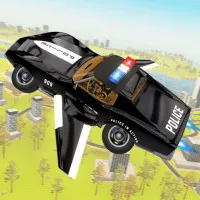
Flying Car Game Police Games offers a unique police driving experience by combining ground speed with the ability to fly through the air. You not only control a patrol car on wide roads but can also activate flight mode to explore the surroundings in a completely different way.
Will you stay on the road and accelerate, or take your police car into the sky? Start the engine and discover this vehicle's special abilities!
Explore Driving and Flying Abilities
Flying Car Game Police Games is a 3D police driving simulation that combines vehicle controls with flying mechanics. Instead of only traveling on regular roads, you can switch between driving and flying modes to explore different ways of controlling your vehicle.
Start Your Journey with a Special Police Car
As soon as you enter Flying Car Game Police Games, you will get to know a police vehicle with a special design. This car not only has regular driving functions but is also equipped with the ability to switch to flight mode.
In ground mode, you can accelerate, reverse, and change direction using the WASD keys. When you want a different experience, press F to activate flight mode. The combination of these two modes allows players to explore the environment freely instead of being limited to regular roads.
Switch Between Driving and Flying
The most outstanding feature of Flying Car Game Police Games is the ability to switch between driving on the ground and flying through the air. When players activate flight mode, the car can leave the road and move through the sky, making you feel like you are controlling a special aircraft.
Game controls
- W: Accelerate.
- S: Reverse.
- A: Turn left.
- D: Turn right.
- C: Lock or unlock the mouse cursor.
- R: Reset the car.
- Left Shift: Activate Nitro.
- F: Turn flight mode on or land.
- I: View instructions.
- P / Esc: Pause the game.
- Left Mouse Button: Fire.
- H: Turn on the police siren.
Tips for Controlling the Police Car Effectively
- Get familiar with both modes: Try driving on the ground before activating flight mode to understand how the vehicle responds.
- Choose the right time to activate flight mode: Press F when you want to take the car into the air, and pay attention when landing to keep moving smoothly.
- Try performing aerial stunts: Once you are familiar with the controls, you can try turning flight mode on and off at different moments.
- Use Nitro wisely: Activate Nitro when you need to accelerate instead of using it continuously without controlling your direction.